What would you like to make?
Choose one task. The editor will show only the controls you need. Your artwork stays on your device.
Current limitation: This does not yet automatically turn a drawing into a finished, textured, animated Ragnarok character. AI geometry is experimental; the editable body is a neutral MakeHuman template.
Build an image-guided 3D character
Fit a real connected 3D body and its skeleton to a front-facing character image. Runs locally without AI weights, paid services or an install. Assisted template fitting: depth comes from the body template. Hair, clothing surfaces and hidden back artwork are not recovered.
2 · Check the joint markers
Use a complete front view with separated limbs and a transparent or plain background. Suggestions use foreground bounds, not automatic anatomy detection. Move incorrect markers by dragging or select a joint and click its position.
Choose an image first.
Keyboard placement and validation sample
Choose an image. Nothing is uploaded.
Bind a generated or imported 3D humanoid instead
Generate a model below or import a single static Y-up, front-facing humanoid GLB. Keep this source image and its markers aligned with that model's pose. This preserves the geometry and adds a 23-joint starter rig. It does not fix fused limbs or missing body parts; inspect weights with the skeleton overlay and QA bends.
Optional: generate new geometry with TripoSR on a capable GPU
Create a 3D mesh from one picture
This runs our own TripoSR code inside your browser; it does not redirect to any 3D service. You need desktop Chrome/Edge, HTTPS, a WebGPU-compatible GPU and a ~485 MB first-run model download. Result: unrigged geometry, not a finished animated character.
Inspect this cutout: background pixels are removed only when connected to an image edge. Best input: one centered character, arms separated, transparent background, no weapon.
OUR GENERATOR · LOCAL INFERENCE — This button never opens another generator website. The model weights and ONNX runtime are downloaded from public providers when needed, while the source artwork stays on your device.
First run needs HTTPS, Internet, a sufficiently capable WebGPU device and a large model download. Diagnostic reports contain stage messages and mesh metrics, never the source image. No paid GPU hosting. On a weak GPU it may fail or take much longer; we don't claim compatibility without running it. Generated GLB is unrigged.
A successful run automatically opens the resulting GLB in our 3D viewer below.
GPU requirements, troubleshooting and privacy
The source image stays on your device. The model and runtime download from external public hosts. A GPU compatibility check is not proof that inference will finish. If generation fails, select Download failure diagnostics and share the JSON for debugging. There is no server-side fallback or paid subscription.
Best image: one complete centered person, distinct limbs, simple background, preferably transparent. TripoSR usually cannot accurately recover hidden back surfaces from one view.
Change a real 3D character's proportions
No GPU model download. Start with a real skinned MakeHuman body, resize parts, watch the model change, then export. Hair, clothing and automatic artwork matching are not implemented yet.
Artwork reference and advanced automatic fitting experiment
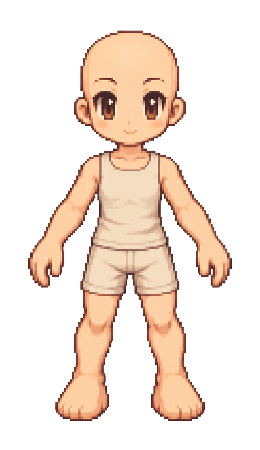
Reference to compare visually. The editor does not yet automatically project its clothes, hairstyle or face onto the mesh.
The image is only a visual reference. This version does not yet build its hair, clothes, or face onto the body. The fitting diagnostic uses a separate annotated male sample and may deliberately reject its own result.
Front reference fitting diagnostic
Fit five proportion controls to the bundled annotated male sample. Front joints drive the fit. Width, depth, clothing and pose remain unresolved. The current model stays unchanged until you choose to inspect the candidate.
Load the rigged template first. Cyan marks known image joints; orange shows projected source triangles.
All 14 animation clips are experimental retargets, not approved game animations.
The viewer displays the actual edited mesh. Rotate to inspect front, side and back. Animation playback is provisional.
Create flat directional game sprites
This creates six flat textured images or billboard GLBs from the supplied artwork. It does not reconstruct a 3D human or create skeletal animation.
Creates a true textured transparent GLB billboard from an individual PNG or a 6-view ZIP for a 2.5D game. No AI, GPU or server upload. This is not a volumetric 3D character or skeletal rig.
Open a 3D model to see what's inside
Load a GLB from your computer, rotate the mesh and check whether it includes skinning, textures and animation tracks. The file is processed on your device.
3D model preview
What is really in the GLB?
No GLB loaded.
Game-ready requirements
Load a GLB to run basic structural checks.
How it works · What each tool can actually do
Choose . Experimental, requires GPU and download.
Choose . Reliable template workflow, but not artwork matched.
Choose . No actual volume or rig.
Choose . Inspect geometry and animation metadata.
What can I export and what is still unfinished?
AI mode: unrigged GLB if the inference succeeds. Body editor: modified skinned MakeHuman GLB with provisional animation tracks. Sprite mode: flat directional GLB and six-view ZIP. Viewer: inspection only. Automatic anime artwork fitting, accurate hair/clothes/face, seamless retargeting and validated game-ready characters remain research tasks.